High findings: 1 · Critical: 0
TopNotch Site Health Pro
TopNotch Site Health Pro · Live PayPal checkout · Private updates
Understand what deserves attention before you change a working WordPress site.
Audit WordPress health, security posture, compatibility, maintenance, performance context, content architecture and internal linking in one explainable report. Get evidence, priorities and practical next steps instead of a mystery score or a risky “fix everything” button.
- Diagnostic-first
- Non-destructive by default
- Remote licensing
- Private updates
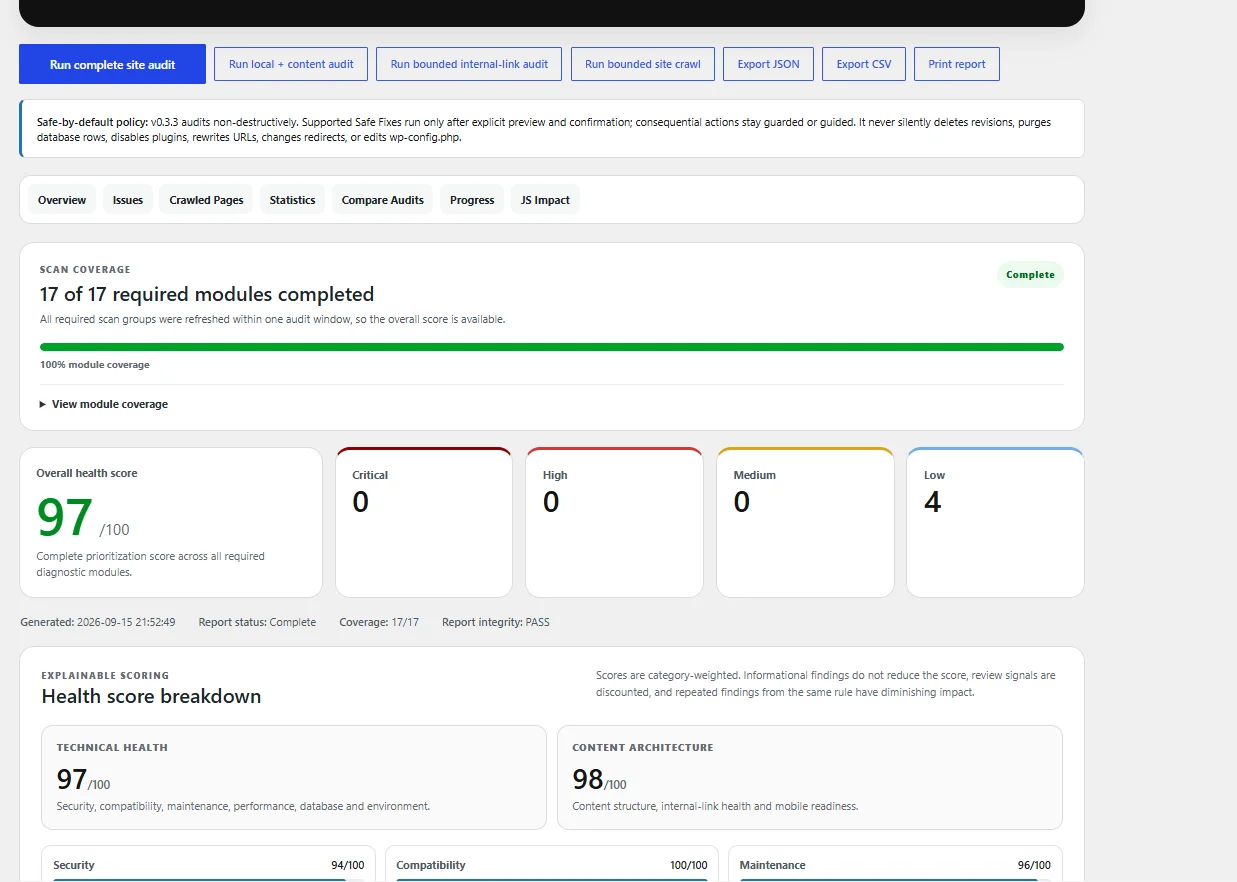
Before / now benchmark
A completed audit moved from 89 to 97 after deliberate cleanup and review.
This is a real product-workflow benchmark, not a promise that every site will get the same score. The value is the process: find what deserves attention, make controlled changes, then run the audit again and compare the evidence.
High findings: 0 · Critical: 0 · +8 overall
Required modules completed
Security, compatibility, maintenance, performance, database and environment
Content structure, internal links and mobile readiness
Bounded internal-link audit result in this run
What you get
One WordPress health report with enough context to act carefully.
TopNotch Site Health Pro is built for site owners, developers and agencies who need more than a generic green or red indicator. It separates confirmed findings, review signals, context-dependent observations and informational notes so you can prioritize rather than panic.
Compatibility & plugin overlap
Reviews WordPress and PHP requirements, theme and plugin compatibility signals, update posture and overlapping responsibilities that may deserve human review.
Security posture
Checks HTTPS, debug exposure, selected response headers, file-editor posture and related hardening signals without pretending to replace a malware scanner.
Maintenance & database
Surfaces cron issues, inactive plugins, revisions, expired transients, database size, large tables, autoloaded options and related maintenance context.
Performance context
Separates page cache, server/CDN cache signals, WordPress cache configuration and persistent object-cache runtime so different layers are not confused.
Content architecture
Reviews duplicate-content similarity, empty published pages and possible orphan candidates while clearly marking signals that still need human judgment.
Internal-link audit
Runs bounded same-host checks for broken destinations, redirect chains and redirect loops using stored content, navigation and rendered-page discovery.
Explainable scoring
Provides overall, technical-health and content-architecture scores for prioritization. Informational observations do not automatically reduce the score.
History & exports
Compare completed audits, inspect progress and export reports to JSON or CSV, or print them for handoff and review.
Real interface
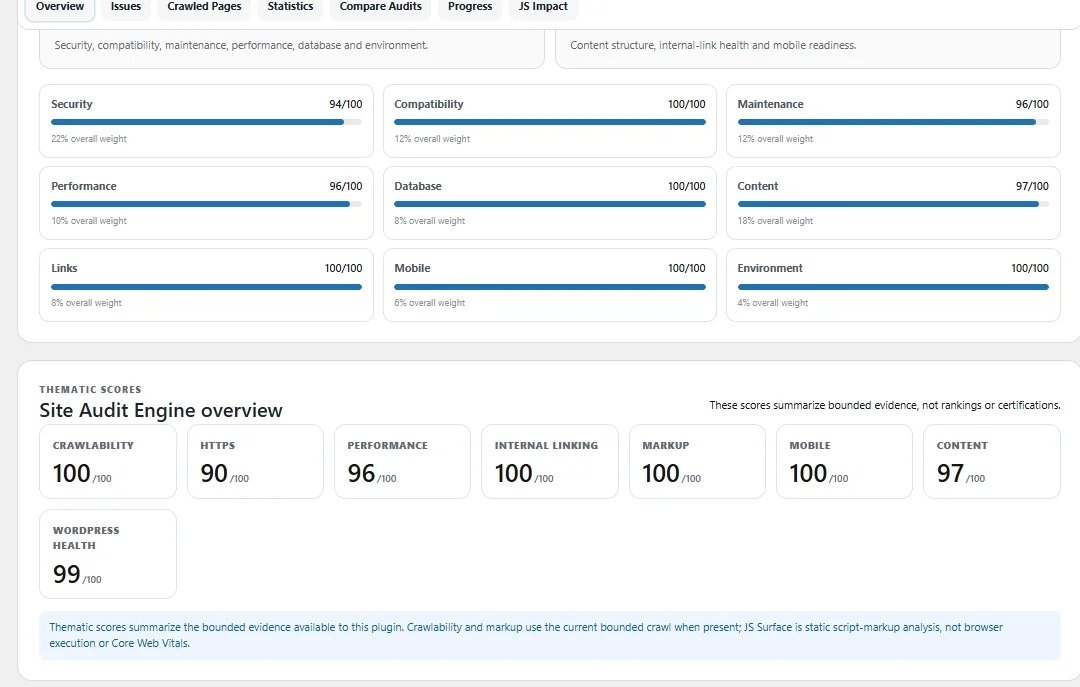
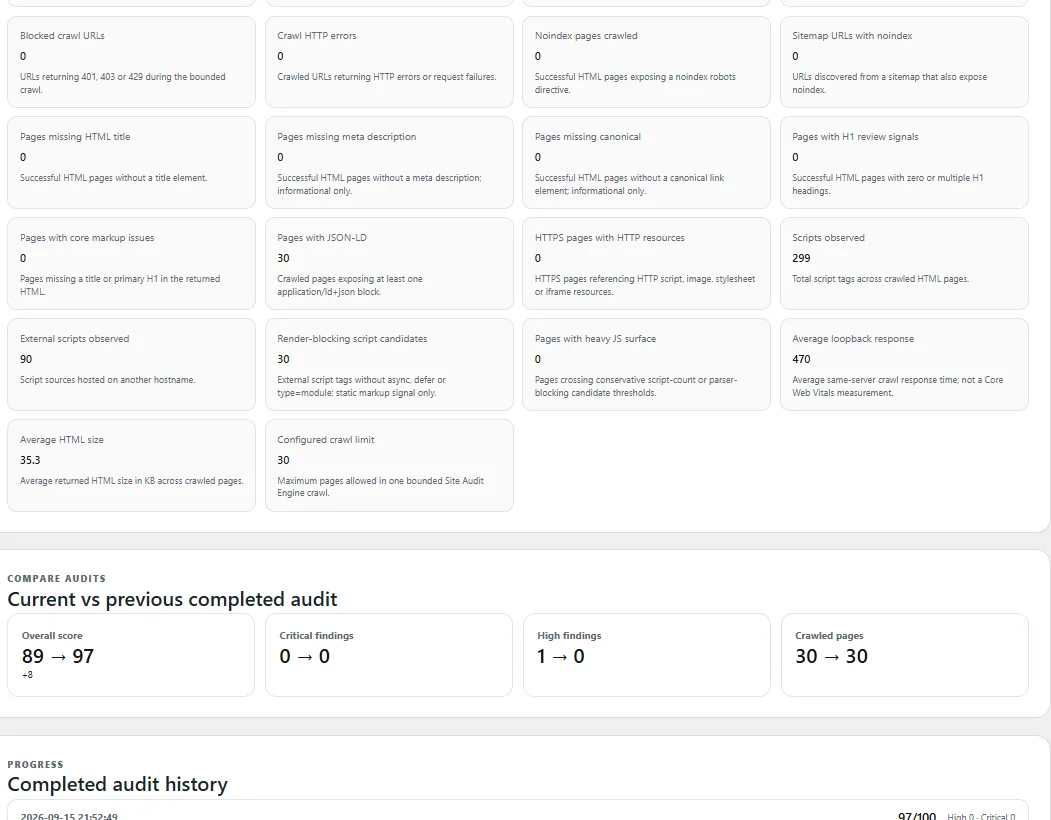
See the score breakdown, audit stages, findings and before/after comparison—not just a headline number.
The dashboard shows exactly where the score comes from and what deserves attention. Customers can inspect technical health, content architecture, crawl statistics, findings, audit history and supporting evidence before changing a working site.
- Category-level score breakdowns
- 17 required modules tracked to completion
- Priority findings with evidence and next steps
- Current vs previous completed audit comparison
Practical findings
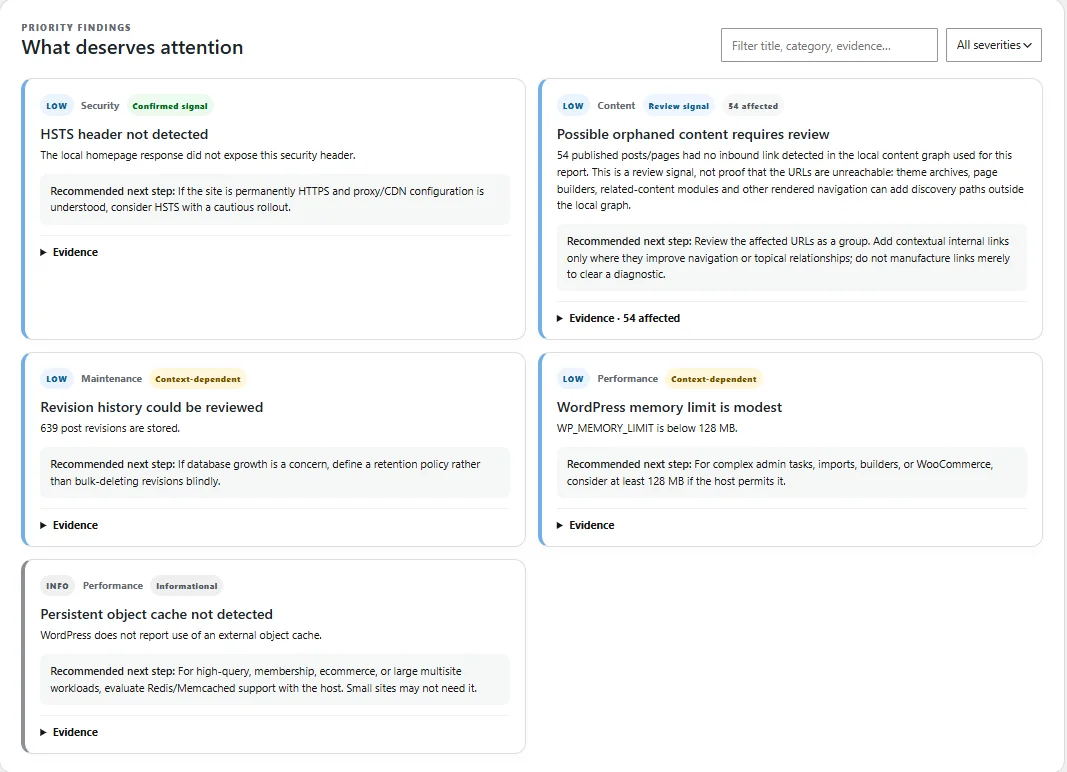
See what deserves attention without treating every notice as an emergency.
A completed audit surfaced examples such as an HSTS header not detected, possible orphaned content requiring review, revision history worth reviewing, a modest WordPress memory limit and an informational persistent-object-cache note. The plugin explains why the signal matters and what to review next.
Annual Pro licensing
Choose the number of WordPress sites you manage.
Every paid plan includes the same Pro feature set. You are choosing how many sites may be active at the same time. Prices are in USD and billed annually.
$70/year
For one WordPress website.
- 1 activation
- All Pro audit features
- Private updates
$150/year
$30 per site/year.
- 5 activations
- All Pro audit features
- Private updates
- Save $200 vs five 1-site licenses
$350/year
About $23.33 per site/year.
- 15 activations
- All Pro audit features
- Private updates
- Save $700 vs fifteen 1-site licenses
$450/year
For agencies and larger WordPress portfolios.
- Unlimited activations under the applicable license terms
- All Pro audit features
- Private updates
Secure checkout
Buy TopNotch Site Health Pro with PayPal.
Choose your plan below. After confirmed payment, the license is issued automatically to the purchase email. Install the plugin, activate the license and private updates become available for the active entitlement.
Installation & first audit
Purchase → install → activate → audit → review → fix carefully.
Purchase your plan
Your license is sent to the purchase email after confirmed payment.
Upload the Pro ZIP
In WordPress go to Plugins → Add Plugin → Upload Plugin. Upload the ZIP itself; do not unzip it first.
Activate the license
Open License & Entitlement, paste the complete license key and confirm Active status plus the correct site count.
Run the complete audit
Keep the admin tab open until the report finishes. Review the Overview and Issues first.
Read evidence before acting
Check whether the finding is confirmed, context-dependent, a review signal or informational.
Make controlled changes
Back up before database, redirect, plugin or configuration work and test important site flows after meaningful changes.
Run the audit again
Compare the new result with the previous completed audit to confirm what actually improved.
Safe by design
Diagnosis is deliberately separate from remediation.
TopNotch Site Health Pro does not silently delete database rows, disable plugins, rewrite URLs, change redirects, edit wp-config.php or apply a blanket “fix everything” routine. That boundary keeps the customer in control of production changes.
Documentation before support
Everything customers need to install, use, diagnose and troubleshoot the product.
Start with the documentation. It covers setup, audits, findings, fixes, licensing, updates, privacy and common errors step by step.
Getting Started & InstallationInstall the ZIP, activate the license and run the first audit.
Running an AuditUnderstand audit modes, timing, tabs and exports.
Understanding Results & FixesPrioritize evidence and make safer changes.
License & Private UpdatesActivate, deactivate, move sites and troubleshoot updates.
Privacy & Data HandlingUnderstand what stays local and what licensing requires.
FAQ & TroubleshootingResolve common install, audit, timeout and license problems.
TopNotch Site Health Pro
Clearer WordPress decisions start with a clearer audit.
Choose the plan that fits your site portfolio, activate the plugin and use the audit evidence to decide what to fix, what to review and what to leave alone.