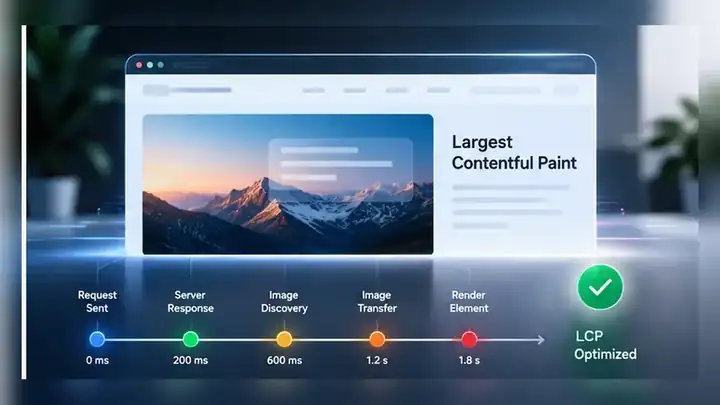
When a WordPress page has poor Largest Contentful Paint, the first recommendation is often “compress the hero image.” Sometimes that is correct. Often it is only one part of the problem.
LCP measures when the largest image, text block or video visible in the initial viewport finishes rendering. A good LCP target is 2.5 seconds or less for at least 75% of visits, measured separately for mobile and desktop.
The useful question is not “which optimization setting can I turn on?” It is “where is the time actually being spent?”
Start by identifying the real LCP element
Do not assume the hero image is the LCP element.
Depending on the template and viewport, the browser may report a heading, a featured image, a background image, a large paragraph or another visible element. Mobile and desktop can also produce different LCP elements.
Use PageSpeed Insights or Chrome DevTools to identify the element being measured before changing anything.
If the LCP element is text, compressing every image on the page may improve transfer size without solving the measured delay.
LCP can be broken into four parts
Google’s web performance guidance breaks LCP into four useful subparts:
- Time to First Byte (TTFB): how long it takes for the browser to receive the first byte of the HTML response.
- Resource load delay: how long the browser waits before it starts requesting the LCP resource.
- Resource load duration: how long the LCP resource itself takes to download.
- Element render delay: how long the browser waits after the resource is available before it can actually paint the LCP element.
Those four parts add up to the LCP time. That is why image compression alone is not a complete diagnosis.
If TTFB is slow, the image is waiting on WordPress
The browser cannot discover most page resources until the HTML response begins to arrive.
On WordPress, slow TTFB may come from expensive database work, uncached page generation, slow external calls, overloaded hosting, excessive plugin work, or a cache layer that is not serving the request you think it is serving.
Before changing front-end assets, compare cached and uncached requests and confirm which layer actually owns page caching.
Our guide on WordPress cache-plugin conflicts and double caching explains why several overlapping caching systems can make performance harder to diagnose rather than easier.
If resource load delay is high, the browser is discovering the LCP resource too late
This is a common reason a well-compressed hero image still produces poor LCP.
The browser can start an image request early when the resource is visible in the initial HTML. Discovery can be delayed when:
- the hero is inserted by JavaScript;
- the image URL is hidden behind a lazy-loading library;
- the LCP image is a CSS background that is only discovered after stylesheets arrive;
- a slider waits for JavaScript before inserting the first slide;
- the template gives the LCP image low loading priority.
Google’s LCP guidance recommends making the LCP resource discoverable as early as possible. For an important above-the-fold image, lazy loading is usually the wrong choice.
If load duration is high, then image optimization matters directly
Once the browser starts requesting the correct image promptly, transfer time becomes easier to judge.
Check:
- whether the file dimensions are much larger than the rendered dimensions;
- whether responsive
srcsetis serving an appropriate size; - whether WebP or AVIF is available where useful;
- whether compression is reasonable for the visual quality needed;
- whether a CDN or closer edge location could reduce transfer time;
- whether several high-priority resources are competing for bandwidth.
Do not reduce image quality blindly. A 40 KB saving is not useful if the image becomes visibly poor and the actual LCP delay is elsewhere.
If render delay is high, the file may already be loaded
This is the case that confuses many site owners.
The LCP image can finish downloading and still wait before it appears. Common reasons include:
- render-blocking CSS;
- synchronous JavaScript in the document head;
- a page builder waiting for scripts before revealing the hero;
- animation or opacity rules that keep the element hidden initially;
- a consent, personalization or A/B testing script delaying visible output;
- large JavaScript tasks keeping the main thread busy.
In that situation, compressing the image again may barely change LCP because transfer time was never the dominant delay.
Fonts can make a text LCP look like an image problem
If the largest element is a heading or large text block, web-font behavior can affect when it becomes visible.
Review whether the required font files are requested early, whether too many font weights are loaded, and whether the CSS font-display strategy matches the design requirement.
TopNotch has a separate guide on the connection between fonts, images and Core Web Vitals in WordPress. Use that when the page’s first screen depends heavily on custom typography.
Do not lazy-load the resource the user is waiting to see
Lazy loading is useful for images below the fold because it avoids spending bandwidth on content that may never enter the viewport.
The LCP element is different. If the main hero image is visible immediately, delaying its request until a lazy-loading script runs creates the exact wait LCP is designed to expose.
Check the final rendered markup, not only the plugin settings screen. Optimization tools can interact, and an exclusion configured in one layer may be overridden by another.
Measure field data and lab data for different reasons
Lighthouse and PageSpeed lab tests are useful for reproducing a controlled page load and identifying opportunities. Field data describes what real Chrome users experienced over time.
They can disagree because real visitors use different devices, networks, geographic locations, cache states and navigation patterns.
A single fast lab run does not prove that most users have a good LCP. A poor lab run also does not automatically explain a field regression.
Use both: lab data to investigate the page, field data to understand whether the problem is widespread.
Where NotchCache fits
NotchCache is built around diagnosis before aggressive optimization. Its current performance controls include page caching, conservative JavaScript optimization, LCP and lazy-loading protections, Google Fonts controls, resource hints and bounded diagnostics.
The value of that approach is not another “enable everything” screen. It is being able to separate server response, cache behavior, resource loading and front-end rendering before applying riskier changes.
A safer LCP troubleshooting order
- Identify the actual LCP element on mobile and desktop.
- Check field data to see whether the problem is persistent.
- Measure TTFB and confirm whether page caching is actually working.
- Check when the LCP resource is discovered and requested.
- Confirm the above-the-fold LCP image is not being lazy-loaded.
- Measure the resource size and responsive-image behavior.
- Look for render-blocking CSS, JavaScript or long main-thread tasks.
- Review font loading if the LCP element is text.
- Change one layer at a time.
- Retest the same URL and preserve a before/after record.
Optimize the delay you can prove
WordPress performance problems become expensive when every slow metric triggers five unrelated changes at once.
Find the LCP element, break the timing down, and work on the part that is actually slow. That keeps the site easier to troubleshoot and reduces the chance that a performance “fix” breaks a slider, form, menu or layout that was already working.
Sources: web.dev’s Largest Contentful Paint reference, LCP optimization guide, and analysis of common LCP optimization misconceptions.