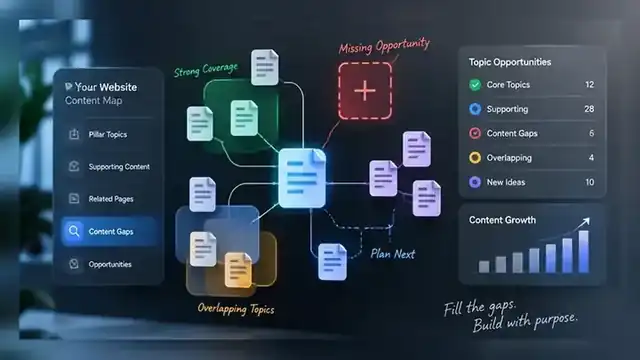
A content gap is not simply a keyword that does not appear in one of your titles.
That definition sounds convenient, but it creates a common WordPress problem: every phrase in a keyword spreadsheet becomes a new URL. A few months later the site has several articles answering nearly the same question, internal links point in different directions, and editors are unsure which page should own the topic.
A useful content gap is a reader need that your site does not yet satisfy well. Sometimes the right response is a new article. Sometimes the gap belongs inside an existing page. Sometimes the problem is not missing content at all—it is weak internal linking or unclear page purpose.
Start with coverage, not with the keyword list
Before looking for something new to publish, map what the site already covers.
For each important post or page, write down its purpose in one sentence. Avoid copying the title. Describe the job the page performs for a reader. For example:
- explains how WordPress page caching works;
- helps a site owner diagnose a plugin conflict;
- compares two ways to structure service-page internal links;
- shows an editor how to decide whether overlapping articles should be merged.
This makes overlap easier to see. Two articles can use different keywords and still serve the same intent.
TopNotch already uses this principle in our guide on turning a keyword list into a WordPress content plan without duplicate articles. A keyword export is research material; it is not a publishing calendar.
There are three useful kinds of content gap
1. A missing intent
The clearest gap exists when people have a distinct question or task and no current page on your site answers it properly.
Suppose you have a broad guide to WordPress caching and a separate article about cache-plugin conflicts, but nothing that helps a reader understand why a page can return a cache HIT and still have poor Largest Contentful Paint. That is a different troubleshooting intent. A dedicated page may be justified because the reader’s problem, evidence and next action are different.
2. Missing depth inside an existing page
Not every uncovered subtopic deserves another URL.
If an existing page already owns the main intent but skips an important question, expand that page. This is usually cleaner than creating a small supporting article that repeats the same introduction, same definitions and same conclusion.
A good test is simple: if a reader searching the narrower phrase would still be satisfied by the stronger existing page after you add one useful section, update the existing page.
3. A missing connection
Sometimes the content exists, but the site treats it like an island.
A supporting article may never link to its pillar. A service page may have no contextual links from the guides that explain its problem space. A useful older article may sit several clicks away from the rest of its topic cluster.
That is not a writing gap. It is an architecture gap.
Our guide to SEO topic clusters in WordPress explains why each page needs a clear role and a deliberate relationship with the rest of the cluster.
Use Search Console as evidence, not as an automatic brief generator
Google Search Console can show the queries that already surface your pages, along with impressions, clicks, CTR and average position. Those signals are useful when deciding whether a topic is genuinely missing.
Look for patterns such as:
- a page receiving impressions for a question it only answers briefly;
- several related queries appearing for one URL, suggesting the page could be expanded;
- important non-branded queries with impressions but no clearly matched landing page;
- two different pages repeatedly appearing around the same query family.
Do not treat every high-impression, low-click query as a command to publish. Google itself recommends examining the page, query mix, titles and snippets when CTR is weak. The right action may be better alignment on an existing page rather than another URL.
Competitor gaps are clues, not assignments
Competitor research can expose questions your own site has ignored, but copying another site’s article list is a poor content strategy.
When you find a competitor page covering something you do not, ask:
- Does our audience actually need this?
- Does the topic support a service, product or existing pillar we care about?
- Can we add first-hand experience, clearer examples or a safer workflow?
- Would the new page have a distinct purpose on our site?
- Are we missing the topic, or merely using different wording?
If the only reason to create the page is that another site has one, the gap is not yet proven.
Check cannibalization risk before approving a new URL
Before a content gap becomes a brief, search your own site.
Review titles, slugs, headings and the actual purpose of related pages. Search Console can add another layer by showing whether several URLs already appear for similar queries.
Then decide whether the proposed page is:
- a genuinely new intent;
- a narrower supporting question that deserves its own treatment;
- a section that belongs inside an existing article;
- too close to an existing page and should be rejected or reframed.
Our search-intent mapping guide is useful when the distinction is not obvious.
Choose between update, support article and new pillar
A practical content-gap review should end with a publishing decision, not just a list of phrases.
Update an existing page when the intent is already owned and the missing material can make that page substantially more useful.
Create a supporting article when the narrower question has enough depth to stand alone and can naturally link back to a broader pillar.
Create a new pillar when an important topic area has no strong central page and several useful supporting questions already exist or are planned.
Do nothing when the idea adds little value, has weak business relevance or would mostly repeat what is already published.
Internal links should be planned before the article is written
A new page should not arrive without a place in the site.
Before drafting, identify:
- the pillar or service page the article should support;
- two or three existing articles that can link to the new page naturally;
- the pages the new article should link out to;
- the anchor language that accurately describes those destinations.
Google recommends descriptive, crawlable links because they help users and search engines understand the relationship between pages. Planning those connections early also prevents the familiar problem of publishing a useful article and leaving it orphaned.
Where TopNotch AI SEO Tool fits
TopNotch AI SEO Tool is designed for this exact stage of planning. It audits existing WordPress content, compares imported keyword research with current coverage, surfaces overlap for review, organizes pillar and long-tail opportunities, and can add optional read-only Search Console context.
The important point is what it does not do: it does not turn every imported keyword into a new post. The final decision remains editorial.
That matters because the safest way to grow an established site is not to publish the largest possible number of pages. It is to add the smallest number of pages needed to cover genuine reader needs clearly.
A repeatable content-gap workflow
- Inventory the important WordPress pages and give each one a plain-language purpose.
- Group related pages into topic families.
- Import or review keyword research as ideas, not automatic assignments.
- Use Search Console to see what existing pages already surface for.
- Mark missing intents, missing depth and missing internal connections separately.
- Check every proposed new URL against current published and scheduled content.
- Choose update, supporting article, new pillar or no action.
- Plan internal links before drafting.
- Write the page around the reader’s task, not around repeating a phrase.
- Review Search Console after publication to see which queries the page actually earns.
The goal is clearer coverage, not a larger archive
A strong content plan makes it easier to explain what every important page is for.
If a proposed article cannot be given a distinct job, it probably should not become a new URL yet. Improve what exists, connect related pages, and reserve new publishing for questions your current site genuinely fails to answer.
If you need a structured review of your existing library, TopNotch’s Content SEO service applies the same inventory, intent, cluster and internal-link logic to a working site.
Sources: Google Search Console’s Performance report use cases, Google’s people-first content guidance, and Google’s guidance on crawlable links and anchor text.